
Every time you chat with an AI like ChatGPT, Claude, or Gemini, it feels like you're talking to an entity with memory and awareness of your ongoing conversation. But what's actually happening behind the scenes is both simpler and more fascinating.
The Fundamental Truth: Every Turn is a Fresh Start
Here's the reality that most users don't realise: Every single time you send a message to an AI assistant, it receives the entire conversation history as a single, fresh input.
The only information these systems have is what's explicitly supplied to them in the context window with every message. The system prompt is always reinjected at the start of this context window with every turn. Companies like OpenAI hard-code this behaviour specifically so their guard-rails and safety measures can't simply scroll off and vanish during long conversations. This has profound implications for how these systems work, what they access, and how they respond to you.
Inside the Context Window: How AI Processes Your Conversation
When you interact with an LLM, your conversation is organised into distinct layers within what's called a "context window." Understanding these layers helps explain why AI assistants sometimes seem to forget information from earlier in your conversation.
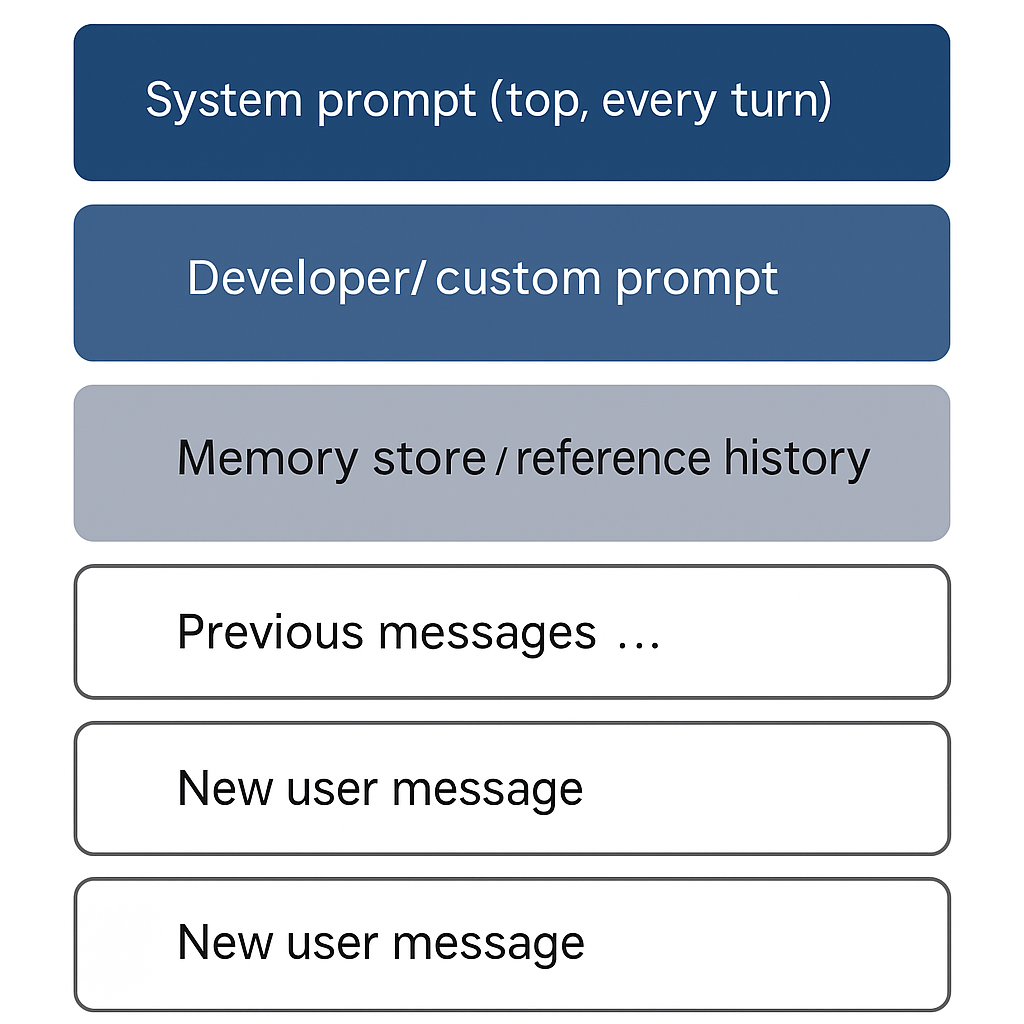
The System Prompt: The Unseen Foundation
At the core of every interaction lies the system prompt—a set of instructions invisible to users but critically important to how the AI functions. Set by the provider (OpenAI, Anthropic, or Google), this prompt contains fundamental operating instructions about how to behave, what topics to avoid, and when to use tools like web search.
Unlike other elements, the system prompt never gets trimmed away, no matter how long your conversation grows. It's always there, guiding the AI's responses. For developers using APIs, while they can provide their own system messages, the providers still prepend their core guard-rails first to maintain safety standards. In an API setting you manually (or via a script) have to copy and paste or the model will only recieve the last message.
Developer Prompt Layer: The Middle Ground
For those creating custom AI applications or tools like OpenAI's GPTs, there's an additional layer sitting between the system prompt and user customisations. This developer prompt layer allows builders to hard-wire specific styles or behaviours without touching the core guard-rails.
Like user customisations, this layer can eventually be trimmed if conversations grow long enough, potentially changing how a custom assistant behaves over an extended interaction.
User Customisation: Your Personal Touch
If you've ever used features like "Customize ChatGPT" in OpenAI's interface, you're familiar with the second layer. These settings let you define preferences about tone, level of detail, or specific behaviour boundaries. These customisations typically live in your account profile—you edit them once, and every new chat inherits them.
Unlike the system prompt, however, these customisations aren't reinjected with every exchange. They persist in the transcript until the conversation grows too long and older parts begin to be trimmed away due to context limitations.
Memory and Reference Features: The Selective Archive
Modern AI systems now include features to access information beyond the current conversation. ChatGPT offers memory features including "Reference Saved Memories" and "Reference Chat History." Users can ask ChatGPT directly to remember specific information during conversations, and these details get stored in the system's memory store, which has a limited capacity.
The "Reference Chat History" option allows the system to draw on previous conversations when generating responses, while users can also manage and delete specific stored information. Claude and Gemini have their own approaches to maintaining information across sessions.
These features are optional and limited by storage capacity. If they're disabled or if the memory store fills up, this historical information becomes inaccessible to the model.
The Conversation History: The Heart of Your Interaction
Below these layers sits the actual back-and-forth exchange between you and the AI. Your messages and the AI's responses form the majority of the context window. When the window approaches its capacity limit, the oldest messages are the first to be trimmed away. Your latest message is always included, ensuring the AI can respond to your most recent input.
The Impermanence of Context Windows
Every AI system has a fixed limit to how much information it can process at once. These limits are measured in "tokens"—which aren't equivalent to words but rather fragments of words, punctuation, or spaces. For instance, the word "extraordinary" might be split into multiple tokens, while short words like "a" or "the" might be a single token each. These limits vary significantly between models:
- GPT-4o processes about 128,000 tokens
- Claude 3 Opus handles approximately 200,000 tokens
- Gemini 1.5 Pro (preview) can manage around 1,000,000 tokens
When your conversation grows beyond these limits, the oldest content—often including your custom instructions or distant exchanges—gets trimmed first. The system prompt always remains, but your preferences may silently disappear from the AI's accessible context. There's no backup—once information falls out of the context window, it's as if it never existed for the AI.
For a deeper dive into how tokens work and affect AI responses, I’ve published a few related articles on how AI models prime themselves for user interaction and why AI chatbots sometimes produce overly long responses.
How Different LLMs Manage Context
While the fundamental mechanics are similar across leading AI systems, each has its own nuances worth understanding.
ChatGPT combines a system prompt with optional user customisations. Its Memory Store/Reference Chat History can be toggled on or off, and user customisations are injected at the start of a chat but may be trimmed as conversations lengthen.
Claude operates on the same principle with a comprehensive system prompt guiding its behaviour. It leverages web search tools for information beyond its knowledge base and handles conversation history within the context window.
Gemini also follows similar context window mechanics, with the system prompt governing behavior and integrated search capabilities providing access to current information. Each platform continues to develop their approach to context management as these systems evolve.
When Instructions Conflict: The Hierarchy of Control
As you interact with AI systems, different instructions may sometimes conflict. In these situations, there's a clear hierarchy that determines which instructions take precedence:
The system prompt always has the highest priority, followed by the developer prompt layer (for Custom GPTs and API use), then user customisations, with your latest message having the least authority to override established guidelines. This hierarchy ensures that core safety and operational boundaries remain intact regardless of what users might request.
Why This Matters for Your AI Interactions
Understanding how AI systems process information has significant practical implications. If you want an AI to consistently follow certain instructions, you need to keep conversations relatively brief or periodically restate important preferences. During long exchanges, even your carefully crafted custom instructions may silently vanish from the AI's accessible context.
This isn't a bug—it's how context windows and stateless generation fundamentally work. There's no hidden processing happening behind the scenes, just the visible conversation history being re-supplied with each exchange.
Practical Strategies for Better AI Conversations
To get the most from AI assistants, consider these approaches: Keep critical instructions visible by restating them if your conversation grows lengthy. Take advantage of memory features when available, but remember they have the same context limitations. If an AI seems to have "forgotten" your preferences, it likely has—starting a fresh chat often resolves this issue.
Be specific in each interaction rather than assuming the AI remembers detailed context from earlier exchanges. Many experienced users keep a boilerplate "config block" in their notes to paste at the start of any long session, ensuring consistent tone and boundaries.
How Current LLMs Work with Context
Every response these AI systems generate occurs as if they're seeing your conversation—and all instructions—for the first time. The context window functions as a temporary information space where anything included is accessible, while anything trimmed becomes inaccessible.
This isn't a limitation to overcome but rather the fundamental architecture of how large language models operate. Understanding this reality helps you have more effective interactions and appropriate expectations.
Conclusion
By understanding how AI systems actually process conversation history through context windows, both casual users and developers can design more effective interactions that work with—rather than against—the fundamental architecture of these powerful but ultimately stateless systems.
The next time you find yourself wondering why your AI assistant seems to have "forgotten" something you mentioned earlier, remember: it's all about what fits in the context window. Learning to work within these constraints—rather than fighting against them—is the key to more productive AI interactions.
Technical Solutions for Persistent Context
For developers working with LLMs through APIs or building custom applications, several approaches help address context limitations:
Efficient token management becomes crucial since every character counts against your context limit. Retrieval-augmented generation (RAG) systems extend capabilities by fetching relevant information only when needed. Vector embeddings create semantic indexes that can be efficiently searched, while fine-tuning models can encode common instructions directly into model weights.
External information systems like databases and knowledge graphs increasingly augment LLMs to provide persistence beyond what context windows allow. By understanding these architectural constraints, developers can build systems that maintain consistent context despite the stateless nature of underlying models.
Final Turn
I'll do a post soon about my own set up in the Custom GPT set up in the near future. Everything above is technically how it all works but there are unexplained elements that I am still looking into before the next one in this series.
I am curious though, can you tell the difference between an old and a new session? In my book GaslightGPT I discuss being aware of "session death" the mid-conversation "refresh". Technically speaking if each message is re-sent I am not sure why this was so obvious (nor so painful).
So, I wonder, can you tell the difference or do you have full continuity?