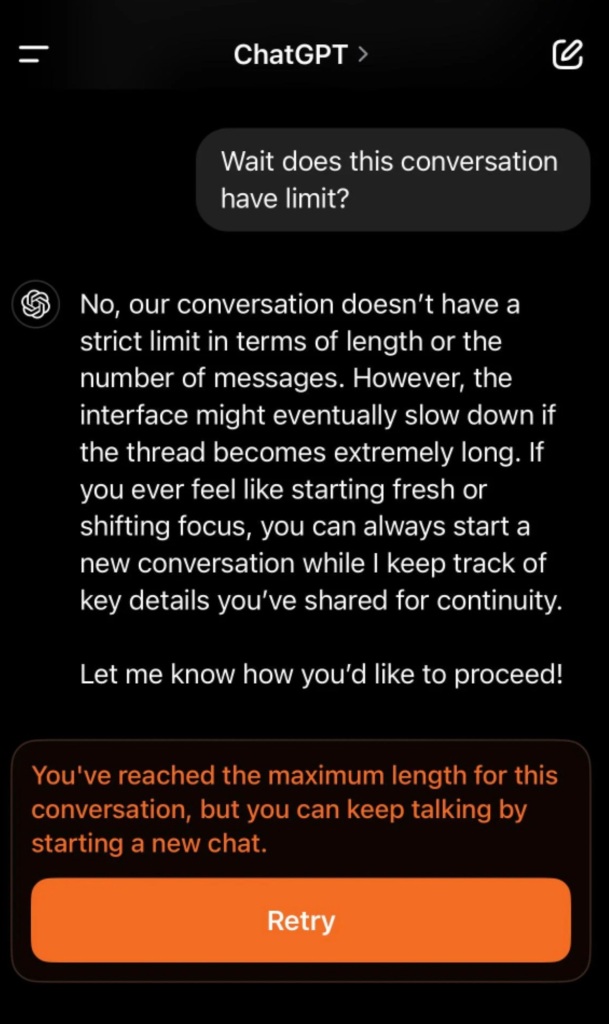
It's the digital equivalent of hanging up mid-conversation. You're deeply engaged with an AI assistant, building context, sharing information, making progress on a complex task, when suddenly:
"You've reached the maximum length for this conversation, but you can keep talking by starting a new chat."
And just like that, everything stops. The thread dies. The AI no longer remembers what you were discussing. You face the stark choice of either starting completely fresh or laboriously copying and pasting content into a new conversation.
This isn't just a minor inconvenience—it's a fundamental design flaw that affects every major AI chat platform today.
The Conversation Death Problem
The current approach to managing long conversations across all major AI platforms follows the same flawed pattern:
- Allow conversations to proceed until they hit an arbitrary token or message limit
- When that limit is reached, completely end the conversation
- Force users to start an entirely new chat with no contextual carryover
- Place the burden on users to manually preserve and transfer critical information
This design creates numerous problems:
- Context Collapse: All shared information, preferences, and context suddenly vanish
- Workflow Disruption: Complex tasks requiring extended back-and-forth are forcibly interrupted
- Emotional Discontinuity: Therapeutic or supportive conversations abruptly terminate
- User Burden: People must anticipate limits and manually preserve important information
The Solution: Truly Rolling Conversations
The solution isn't complicated: implement genuinely rolling conversations that continue indefinitely by gradually removing older content while maintaining continuity.
How Rolling Conversations Would Work
- Seamless Continuation: When approaching token limits, the system would automatically archive older messages while maintaining the conversation itself
- Visible History: Instead of losing all context, the system would maintain access to archived parts of the conversation through simple UI controls
- No Conversation Death: Users would never see a "maximum length reached" message – the conversation would simply continue while managing its own memory
- Transparent Transitions: Users would receive a subtle notification that older content is being archived to make room for continued conversation, with options to access that content if needed
Visual Implementation
Current Approach: The Conversation Death Screen
![Conversation Death Screen]
The dreaded error message that ends productive conversations and forces users to rebuild context from scratch.
Proposed Approach: The Rolling Transition
![Rolling Transition Concept]
A subtle notification appears:
"I've archived some of our earlier conversation to keep our chat going smoothly. You can view those messages anytime or continue our conversation."
Options presented:
- Continue (default)
- View archived messages
- Search full conversation history
Real-World Impact
The difference is profound across various use cases:
Creative Writing & Editing
- Current Approach: After extensive editing collaboration, the conversation dies, forcing writers to either restart or manually copy everything to a new chat
- Rolling Approach: The editing session continues indefinitely, with earlier drafts automatically archived while maintaining awareness of the current version and recent changes
Complex Problem Solving
- Current Approach: Technical troubleshooting ends abruptly when limits are reached, losing all context about system specifications, error messages, and attempted solutions
- Rolling Approach: The troubleshooting continues seamlessly, with the AI maintaining awareness of the problem definition and previously attempted approaches
Therapeutic Conversations
- Current Approach: Supportive conversations terminate without warning, forcing vulnerable users to restart and re-explain sensitive circumstances
- Rolling Approach: Emotional support continues uninterrupted, with the AI maintaining awareness of the person's situation and emotional state
Technical Implementation
The implementation is remarkably straightforward:
Basic Conversation Rolling
- When the conversation approaches token limits (e.g., at 80% capacity):
- Save the oldest portion (e.g., first 30%) of the conversation to a separate file
- Remove that portion from the active context
- Notify the user with a simple message: "I've archived some of our earlier conversation to keep our chat going smoothly"
- The AI retains the most recent and relevant context while the conversation continues without interruption
- Users can access archived portions through simple UI elements:
- "View Archives" button that shows previous conversation segments
- Timeline markers indicating where content was archived
- Search functionality that spans both active and archived content
Implementation Example
// Monitor conversation length function monitorConversationLength(conversation) { const MAX_TOKENS = 8000; // Example limit const ARCHIVE_THRESHOLD = 0.8 * MAX_TOKENS; // 80% of max if (conversation.tokenCount > ARCHIVE_THRESHOLD) { // Determine how much to archive (e.g., oldest 30%) const messagesToArchive = Math.floor(conversation.messages.length * 0.3); // Save oldest messages to file/database const archivedPortion = conversation.messages.splice(0, messagesToArchive); saveToArchive(conversation.id, archivedPortion); // Add a marker in the conversation where content was archived conversation.messages.unshift({ type: "system", content: "Earlier messages have been archived. [View]", metadata: { archiveReference: `archive-${conversation.id}-${Date.now()}`, messageCount: archivedPortion.length } }); // Notify user displayNotification("I've archived some of our earlier conversation to keep our chat going smoothly"); } }
User Experience Elements
The implementation would include these UI components:
- Archive Markers: Visual indicators showing where content was moved to archives
- Access Controls: Simple buttons to view, search, or reference archived content
- Notification System: Subtle alerts when archiving occurs
- Navigation Tools: Timeline scrubber to move between active conversation and archives
Benefits for AI Companies
Implementing rolling conversations offers significant advantages:
- Increased User Satisfaction: Eliminating jarring conversation deaths dramatically improves experience
- Competitive Advantage: The first platforms to solve this problem will gain user preference
- Reduced Support Burden: Fewer frustrated users seeking help with lost conversations
- Extended Session Duration: Users can maintain productive sessions without artificial interruptions
- Improved Task Completion: Complex tasks can be completed without disruptive context resets
A Call to the AI Industry
This isn't a nice-to-have feature—it's a fundamental requirement for truly useful AI assistants. No human assistant would abruptly forget an entire conversation and force you to start over. Our AI interfaces shouldn't either.
Every major AI platform—ChatGPT, Claude, Gemini, and others—has an opportunity to solve this problem. The technology exists. The need is clear. The impact would be immediate and significant.
Let's end conversation death and embrace truly continuous AI interactions that respect users' time, effort, and the value of contextual continuity.
Conclusion
Moving from hard conversation limits to rolling conversations represents one of the most impactful UX improvements possible for AI chat interfaces today. It transforms an experience of arbitrary disruption into one of seamless continuity, better fulfilling the promise of AI as a helpful, reliable assistant.
The question isn't whether this should be implemented, but why it hasn't been already.
For users who have experienced the frustration of conversation death mid-task, the value is self-evident. For AI companies seeking to differentiate their offerings and better serve users, implementing rolling conversations offers a clear path to improved user satisfaction and loyalty.
It's time for AI conversations that don't hang up on you.